Because not a week seems to go by without a major service being hacked these days, it’s more important than ever to drop that “same password for all services” approach if you are still using it. Make it your 2014 resolution!
I used to use the same password for different services I considered in a certain “importance level” (roughly banks > emails > social networks > tools I plan to only try once), but some tools turned out to change importance level, while others didn’t fit neatly into one category. So while this felt already quite secure to me, it was not ideal.
I also hate using a desktop app, USB key or separate password-manager solution to generate and manage passwords, because it defeats the good part about cloud apps being instantly accessible from any computer or device. I want to remember my passwords myself, especially since I always say no to browsers offering to remember them for me.
There are as many password strategies as there are people, it seems. So here’s mine.
Why XKCD’s strategy doesn’t work
Let’s start with a laugh, with the now-infamous XKCD comic on password strength:
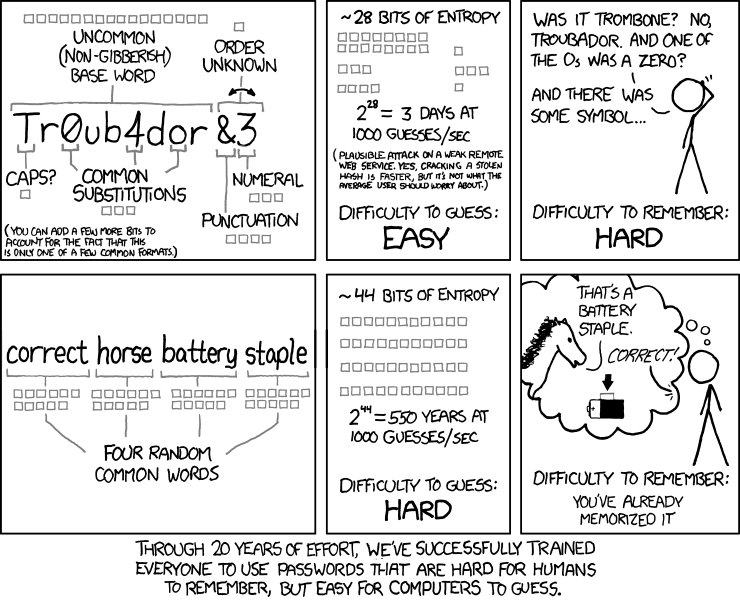
Now, while entropy plus “easy to remember” is nice, this overlooks the fact that a good password is short—not four characters, but perhaps ten rather than thirty. It is hard to correct or remember where you were in your password when it looks like a long row of asterisks in the input box. All the more so on mobile.
Properties of a good password
In my humble opinion, a good password should be:
- Between 8 and about 15 characters. Less and some sites will complain that it’s too short; longer and it suffers from the problem mentioned above.
- Easy to remember, so you don’t have to waste time when logging in to a service.
- Dictionary-attack secure: not just an English word, a concatenation of words, or your birthdate, because those can be cracked using a dictionary or rainbow-table attack on sites that don’t salt their passwords.
- Reuse secure: if somebody knows your password for one site—either because they hacked something or you gave it to them—they shouldn’t be able to use it on other sites.
So here’s how I do it. It satisfies the above criteria, and you don’t have to be a genius to remember it.
Some special cases before we get to the jackpot
First, some special cases you may consider before I divulge my super-duper password strategy that I think everybody and their mom should adopt.
1. Trivial passwords for things you are likely to share
You do require a login to your computer, right? In any case, this is a password very likely to be shared with people close to you at some point. They want to change the music at your dinner party while you are cooking in the kitchen; your flatmate needs to look up something that’s on your computer while you are in another country. So this should be separate from any other password, and can be a simple word with a number after it or something, so you can easily say it over the phone.
Another one is your home Wi-Fi network. Make this easy to remember and share. For me it’s just a very close variation of the network name, and this has worked well so far.
2. Passwords at work
Something similar could apply to some services used at your job, depending on what kind of work you’re in.
3. A separate password for banks and email?
Because this is really the most important thing of all, I have a totally separate password for my Gmail and banks, which is long, impossible to guess, and cannot be deduced from the strategy below. But I think these exceptions are just because I’m paranoid. If you simply include the above cases in the strategy below rather than memorizing a special case for them, you’re probably still way better off than whatever you’re doing now.
The killer approach: gibberish string + app-specific string + mix-up algorithm
So here we have it. My ideal password is a mix between something that depends on, and is easily—but not trivially—deduced from, the app name, plus a string of random “typical” password gibberish. This satisfies all of the good-password criteria I listed above, and assures I score “very strong” on about every security-level meter they put next to passwords. Feels good, man.
Original image: a password-strength meter showing a “very strong” score — unavailable in the surviving archive.
For example, imagine the gibberish string is Bxx12ab!3. Containing an uppercase
letter, numbers and a symbolic character, and being over eight characters, that one satisfies
virtually every “safe enough” check on sites, both in length and complexity.
The second part is the algorithm that depends on the app it is for, so that it is unique to that
app. This prevents it from being reused should the app be hacked, or should you exceptionally have
to give the password to somebody else. Here, for example, you could use “reverse the first two
characters of the app and attach them at the end.” Your password for GitHub becomes
Bxx12ab!3Ig; your password for Facebook becomes Bxx12ab!3Af; and so on.
If somebody gets hold of more than one of your passwords they might spot the pattern, but from seeing just one it’s hard to guess. And that makes it infinitely better than just reusing the same password.
The one thing that isn’t covered yet is the annoying habit some tools have of forcing you to
change your password every few months, while requiring that it be different enough from the
previous one. This typically leads to people writing the password on a Post-it note, defeating
the purpose. But for this, you can have a strategy like “increase the a by one in the
alphabet, and the 3 by one.” So if GitHub were to require a change, you could change it
to Bxx12bb!4Ig.
Conclusion
So that’s my password strategy. After Apple annoyed me with the requirements for its Apple ID password and I resolved to fix this mess once and for all, it took me about thirty minutes to fix this in all the apps I could think of, and then another month of doing it whenever I logged in to an app I hadn’t fixed yet.
In summary, all you have to remember is:
- One gibberish “strong password” string.
- One algorithm to transform the app name.
- Some easy passwords likely to be shared with others, for your computer and Wi-Fi network.
It’s easy to remember this—especially since you’ll be typing your gibberish string over and over again. It never gets complaints from an app that it’s not secure enough (au contraire!), and it feels more secure than any other password habit I have tried or seen so far.
To get the same level of satisfaction and improvement in quality of life as throwing out all your socks and buying twenty identical pairs of black ones, implement this now and make this the year you once and for all stopped worrying about passwords.
What do you think? I am not at all a security specialist, so if you are: did I miss something here?